News
What’s New!
Version: v2.2.0-v2.2.2
Found a winner? Apply it in one click. No more typing inputs by hand.
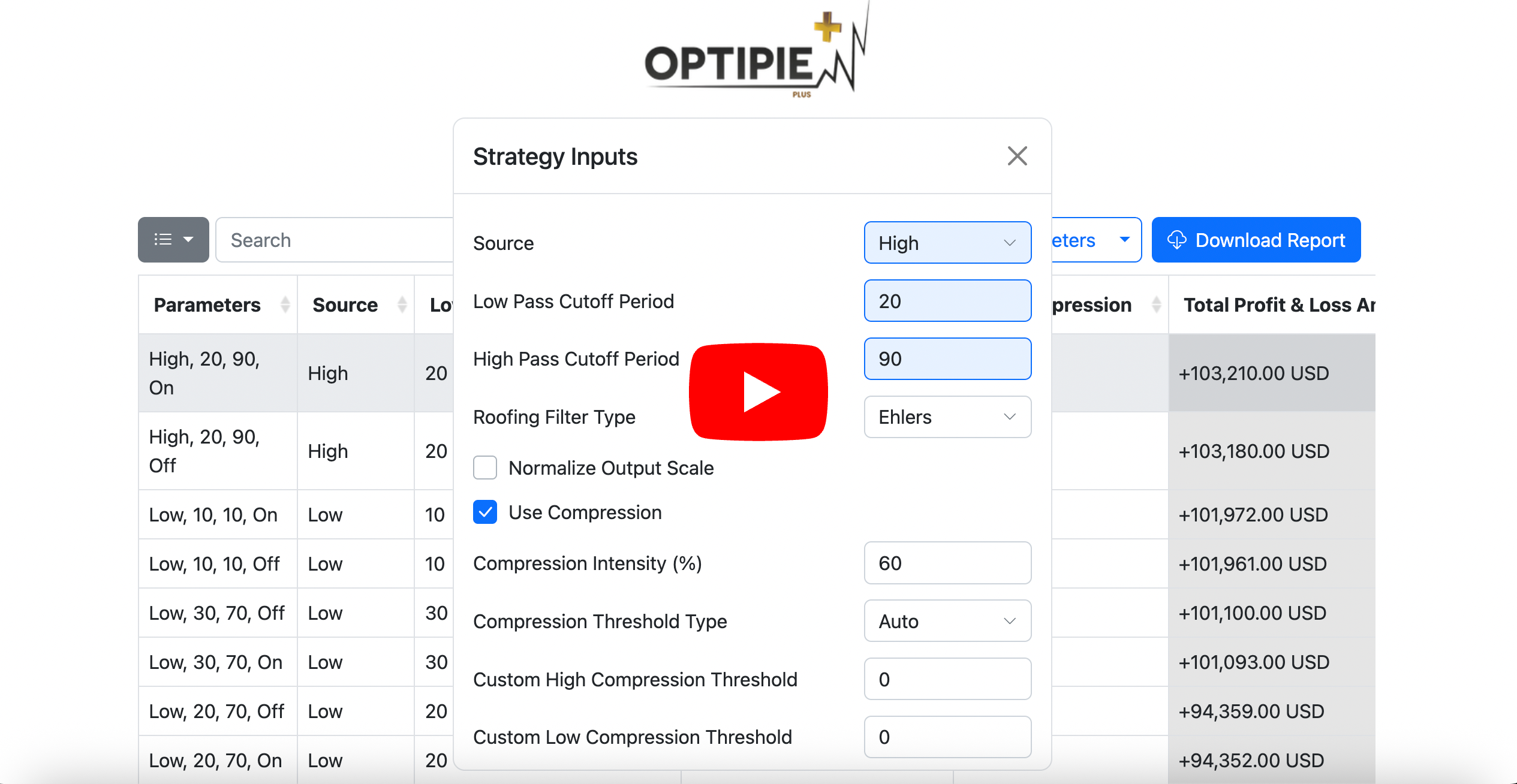
- Copy Parameters on the report detail page. Select any row and copy its values: the optimized values only, or every strategy input as it was when the report ran.
- Apply them from your strategy settings. The new Apply button fills in every input, you review and press Ok. Open OptiPie once on the chart tab to make it appear.
- Strategy Inputs on the report detail page. See every input of the run, and click through rows to preview each result’s values.
- Available for everyone, on new reports.
- Bulk Delete on the Reports tab. Select several reports, or everything before a date, and remove them at once.
- General small bug fixes.
- Hotfix to match latest TradingView changes.
Previous Updates
Version: v2.1.0
Open faster, decide better.
- Three new metrics on the report detail page.
- RoMaD, net profit over maximum drawdown.
- Expectancy, average profit or loss per trade.
- Payoff Ratio, average win against average loss.
- Blazing fast Reports tab. No more waiting on the extension. Reports open the moment you click, however many you have saved.
- Reports using different number formats now work as expected, including sorting correctly on profit, drawdown and every other column.
- Cleaner CSV export. Currency has its own column, parameter columns come first, and negative values use a plain minus sign.
- General small bug fixes.
Previous Updates
Version: v2.0.0
The biggest update OptiPie has seen so far. Backtests, stronger than ever with Walk-Forward Analysis.
- Walk-Forward Analysis is here. It takes optimization one step further: instead of trusting a backtest that scored itself on data it already knew, it forces your parameters to prove themselves on price they have never seen.
- UI/UX improvements for the grid search and report detail pages.
- Improved support for non-English number formats, so profit values that use comma or dot separators are read correctly.
- General small bug fixes.
Previous Updates
Version: v1.5.1 - v1.5.3
Same strategy, no re-typing.
- Try Last Used Parameters — Enable in Settings to automatically carry over parameters when running the same strategy across different symbols or intervals.
- Maximized report view support — Optimizations now work correctly whether the backtesting panel is minimized or maximized.
- Keep up with TradingView UI Changes — Optimizations work as expected with the latest TradingView UI changes.
Previous Updates
Save & Restore Your Optimizations!
No more re-entering parameters, Switch strategies freely.
- Auto-save per strategy — OptiPie remembers your optimization parameters per strategy, symbol, and interval.
- Auto-restore on switch — parameters are automatically restored when you switch back to a strategy.
- Reset Parameters button to clear inputs and start fresh.
- Saved configs are automatically cleaned up after 30, 60, or 90 days — configurable in Settings.
Version: v1.5.0
Previous Updates
Real-time Report Monitoring & Instant Analysis!
No delays. No data loss. Analyze instantly.
Increase timeout for slow-loading strategies, through Settings
- Keeping up with the TradingView UI updates to keep extension functional.
- Added progress spinner to show whether Optimization is still running or not.
- Selectable parameters bug is fixed.
- Multi-time Frame optimization bug is fixed.
- Optimization performance is improved.
- Improved support for non-English languages.
Version: v1.4.0 - v1.4.7
Previous Updates
Start Optimizing Selectable and Checkbox Inputs
Checkbox and Selectable inputs are now optimizable, exclusive to Plus users.
- OptiPie is synced with the latest TradingView changes.
- Deepback testing optimizations function as expected.
- DatePicker causing an issue with the optimization process has been fixed.
- Improved user experience when navigating through different strategies.
- Convenient and Cleaner Report Summary for Plus users.
- Optimization speed has been updated and balanced.
Latest Version: v1.3.0 - v1.3.4
Version: v1.2.7
Deep Backtesting is now supported! 📢
Optimize with Deep Backtesting mode, available for both Plus and Free users.
Stay tuned for Upcoming release!
Selectable and Checkbox inputs will be available for optimization, exclusive to Plus members
Version: v1.2.5 - v1.2.6
- Know how big your optimization will be, number of iterations for given parameters are dynamically shown at the top-right corner.
- Fixed an issue if optimization report has a missing field, do not fail to capture rest of the data for that step.
- Fixed an issue where some of non English languages were not working properly with OptiPie.
Version: v1.2.2 - v1.2.4
-
Due to recent TradingView updates, OptiPie was failing to run an optimization.
-
Problem is now resolved as Chrome approved the release.
-
Please make sure OptiPie version is updated to v1.2.4, if not please follow the link below
Version: v1.2.1
- Parameter Limits are increased! 🔓
- OptiPie - increased from 4 to 5 Parameters
- OptiPie Plus - increased from 8 to 20 Parameters
- Execution speed for the optimization process has been further improved, along with the mitigation of edge-case issues.
Version: v1.2.0
-
Enter any ‘Step size’ now!
Step Size value no longer needs to match with Pinescript’s Step Size value.
- Execution speed for the optimization process has been drastically improved, especially when the optimizing tab is inactive
- Fixed an issue of not generating report when initial strategy tester parameter value(s) is identical with the OptiPie start value(s)